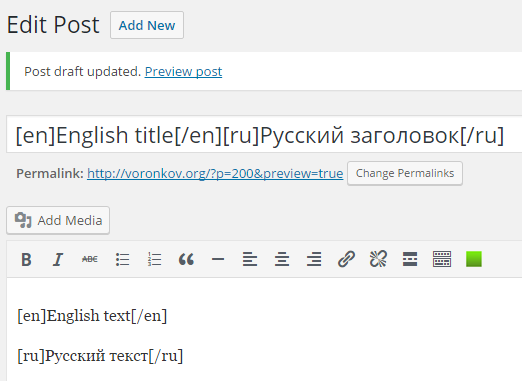
This approach is used on this site, it is simple to implement but has some drawbacks and limitations.
This is not a complete code, it’s just a decision of how you can enable multilingual support for WordPress.
Given the texts of the programs involve maintaining two languages: English and Russian, languages can be more.
Disadvantages:
- Should always be a Russian and English version of the text in all places.
- In the admin panel, the headers look unreadable.
- You cannot use the following markup for categories and tags if they are direct output via function wp_list_ […], and the like.
- When using additional text in your PHP code you should always call the function-translator.
- Search engines will always receive text for the default language. I use my additional redirect plugin on my site when English is enabled, so search engines see both versions of the page.
This approach is very simplistic and good for simple sites.
Use in posts and pages:
- [ru]Русский текст[/ru]
- [en]English text[/en]
Use in PHP code:
<?php
//-- echo --
stringTranslate('[en]English text[/en][ru]Русский текст[/ru]');
//-- value --
$text = stringTranslate('[en]English text[/en][ru]Русский текст[/ru]', false);
?>
Implementation:
common.js (file javascript with your code):
function changeLanguage(ob) {
  if (ob == "ru") {
    if (!confirm("Please, confirm changing language interface to English.")) {
      return;
    }
    document.cookie = "lang=en";
  }
  else {
    if (!confirm("Подтвердите, пожалуйста, смену языка интерфейса на Русский.")) {
      return;
    }
    document.cookie = "lang=ru";
  }
  location.reload();
}
On my website I use the simple Wodpress theme, i.e. there are no templates, additional files, etc. So here is an example only for the main schema file. This block displays two icons to switch languages, similar to those you can see on this website. The example of using the data display function in the code above.
index.php:
//.... HTML markup before
<img src="<?php bloginfo('template_url'); ?>/images/en.png"
  <?php echo (($lang == "en")?("title='English language is setting now.'"):
  ("style='opacity: 0.2; cursor: pointer;' onclick='changeLanguage(\"ru\");'
  title='Set English as interface language.'")); ?>/>
<img src="<?php bloginfo('template_url'); ?>/images/ru.png"
  <?php echo (($lang == "ru")?("title='Русский язык интерфейса сейчас установлен.'"):
  ("style='opacity: 0.2; cursor: pointer;' onclick='changeLanguage(\"en\");'
  title='Установить русский язык интерфейса.'")); ?>/>
// HTML markup after ...
functions.php:
add_filter( 'the_content', 'content_translate' );

function content_translate ($content) {
  return stringTranslate($content, false);
}

function stringTranslate($str, $isEcho = true) {
  $rez = $str;
  if ($_COOKIE['lang']) {
    $lang = $_COOKIE['lang'];
  }
  else {
    $lang = 'en';
  }
  $rStr = 'ru';
  if ($lang == 'ru') {
    $rStr = 'en';
  }
  $am = 0;
  while (true) {
    $pos1 = strpos($rez,"[".$rStr."]");
    if ($pos1 === false) {
      break;
    }
    $pos2 = strpos($rez,"[/".$rStr."]");
    if ($pos2 === false) {
      $pos2 = strpos($rez,"[".$lang."]",$pos1);
      if (!$pos2) {
        $pos2 = strlen($rez);
      }
    }
    else {
      $pos2 += strlen("{/".$rStr."}");
    }
    $rez = str_replace(substr($rez, $pos1, $pos2 - $pos1), "", $rez);
    //-- decline endless cycle --
    $am++;
    if ($am > 100) {
      return "Cycle error!";
    }
  }
  if ($isEcho) {
    echo str_replace('[/'.$lang.']', "", str_replace('['.$lang.']', "", $rez));
  }
  else {
    return str_replace('[/'.$lang.']', "", str_replace('['.$lang.']', "", $rez));
  }
}
That’s all, I wish you all good luck.